Close Menu
Infoceptor
  • Business
  • Finance
  • Technology
  • Health
  • Life
  • More
    • Auto
    • Food
    • Health
    • Home
    • Space
    • Travel

Subscribe to Updates

Get the latest creative news from FooBar about art, design and business.

What's Hot
Flywheel Logo

Flywheel review in 2023

June 8, 2023
Travel restrictions in Canada are different depending on where you're traveling from and to. Here's what you need to know before you go.

Canada: Traveling restrictions and what you need to know before you go

May 19, 2024
If you are planning a trip to Spain, there are some travel restrictions that must be taken into consideration.

Spain: Traveling restrictions and what you need to know before you go

May 19, 2024
Facebook X (Twitter) Instagram
Infoceptor
  • Business
    This guide will show you how to determine the value of your business using different business valuation methods.

    How to value you business – The ultimate guide for 2023

    May 9, 2024
    Have you ever thought of starting your own laundry service? Find out how with this easy guide.

    How to start a laundry service company in 2023

    May 5, 2024
    Learn about the best online payment solutions available to you. Check out what’s available, learn their pros and cons, and choose the one that best fits your needs.

    The 15 best online payment solutions in 2023

    April 27, 2024
    Learn how to create powerful backlinks for your website and increase your site's search engine ranking.

    How to build backlinks to your website

    April 25, 2024
    In this beginner's guide, we will show you the steps involved in creating a mobile app.

    Beginner’s guide on how to develop a mobile app

    April 24, 2024
  • Finance
    Learn how to build wealth and financial security. This article will share steps you can take to build a reliable cash reserve that will grow over time.

    Do you want to build wealth? Here are some ways to grow your money

    May 18, 2024
    Want to know your tax bracket? Check out our article for an overview of the different brackets and what you can expect to pay in 2022.

    Understanding IRS tax brackets – here’s what you’ll pay in 2023

    May 14, 2024
    This article will cover the best electric vehicle battery stocks to buy and invest in.

    The 10 best EV battery stocks to buy in 2023

    May 9, 2024
    The 10 most active penny stocks to watch this year is a list of the most active penny stocks ranked by total volume.

    The 10 most active penny stocks to watch in 2023

    May 8, 2024
    These electric car stocks are making a lot of money and you should consider adding them to your portfolio.

    The best electric car stocks to buy in 2023

    May 8, 2024
  • Technology
    Flywheel Logo

    Flywheel review in 2023

    June 8, 2023
    This article provides a list of the top iPhone models available today. Each model is reviewed based on features, specifications, performance, design and price point.

    Top iPhone models we’ve tested and you should get

    May 17, 2024
    Find out everything you need to know about the Apple Airpods Pro, including their price, features and if they're worth buying.

    Are Apple AirPods Pro a great choice in 2023?

    May 17, 2024
    To help you find the best responsive WordPress themes, we analyzed more than 100 themes and found those that are currently trending.

    The best responsive WordPress themes in 2023

    May 16, 2024
    These sympathy gifts make a great way to show you care while they also help your loved ones get through the tough times.

    The 15 best sympathy gifts that will show you care

    May 15, 2024
  • Health
  • Life
    These sympathy gifts make a great way to show you care while they also help your loved ones get through the tough times.

    The 15 best sympathy gifts that will show you care

    May 15, 2024
    Water bottles are a great way to stay hydrated. This article is dedicated to the most popular water bottles of the year!

    The best water bottles of 2023

    May 10, 2024
    Learn 30 weird and fun facts that will make you question everything.

    30 weird and fun facts that will make you question everything

    May 10, 2024
    Find out which cities in the US are the best for quality of life by checking out this article.

    20 best cities for quality of life in the USA

    May 7, 2024
    There are many ways to print your designs on t-shirts. Check out our list of the best printing services that offer top-notch quality at affordable prices.

    The 10 best T-shirt printing services of 2023

    May 6, 2024
  • More
    • Auto
    • Food
    • Health
    • Home
    • Space
    • Travel
Facebook X (Twitter) Instagram
Trending
  • Flywheel review in 2023
  • Canada: Traveling restrictions and what you need to know before you go
  • Spain: Traveling restrictions and what you need to know before you go
  • Do you want to build wealth? Here are some ways to grow your money
  • Our in-depth review of the Always Pan
  • Top iPhone models we’ve tested and you should get
  • Are Apple AirPods Pro a great choice in 2023?
  • The best shower heads of 2023
Infoceptor
Home»Technology»Domain Names»What is a subdomain and what is it used for?
Domain Names

What is a subdomain and what is it used for?

Matthew DrummondBy Matthew DrummondJanuary 4, 20247 Mins Read
Facebook Twitter LinkedIn Reddit Telegram WhatsApp Pinterest Email
Read Infoceptor's guide on subdomains to learn what they are and how to use them.
Share
Facebook Twitter LinkedIn

Domain names can have different parts, sometimes called subdomains.

A subdomain is a domain that is part or an extension of your main domain.

For example, in test.infoceptor.com, “test” is the subdomain.

What is a subdomain and what is it used for?
  • What are subdomains used for?
  • What are wildcard subdomains?
  • How to create subdomains
  • Subdomains and SEO
  • Subdomain or subdirectory?

Creating a subdomain allows you to expand, organize, or localize sections of your website on various related topics or to new regions and languages.

You can create more than one subdomain if you like.

Here are a few more subdomain examples using our domain name infoceptor.com:

  • community.infoceptor.com => community is a subdomain
  • blog.infoceptor.com => blog is a subdomain
  • business.infoceptor.com => business is a subdomain

There are various reasons companies and individuals use subdomains.

Let’s explore some of the most popular reasons for using a subdomain.

What are subdomains used for?

Many people find that it’s helpful to create a subdomain for testing updates to their website before pushing live.

Developers often use what is known as a staging site, which is set up to have the same configuration as the main website.

A subdomain can help you organize, localize, or extend parts of your website.

If we created a staging subdomain for our domain name, it could be staging.infoceptor.com or testing.infoceptor.com.

If using WordPress, developers are able to test new plugins and updates on staging websites before publishing changes to the live website online.

A subdomain is also often used for an Ecommerce online store, for example, store.yoursite.com. Online stores are frequently created with a separate subdomain because of the complex nature of the setup involving online transactions.

Website owners often use subdomains for the mobile version of their websites (mobile.yoursite.com) or to create country specific websites to serve certain regions, languages, or populations (ca.yoursite.com, es.yoursite.com, eu.yoursite.com).

You can also create subdomains for sections within your website catered to members or contributors. The subdomains could be ‘invites.yoursite.com’ or ‘participants.yourwebsite.com’ or anything you’d like.

Subdomains can also be used for:

  • News section for your website (news.yoursite.com)
  • Blog section of your website (blog.yoursite.com)
  • Separated sites for associated brands
  • To organize sections of your website on various related topics (business.yoursite.com, politics.yoursite.com, food.yoursite.com, etc.)

There are many other ways to use subdomains, these are just a few examples. Depending on your brand and website goals, the use of subdomains can vary.

What are wildcard subdomains?

A wildcard subdomain is a special type of subdomain that allows you to create unlimited subdomains under your main domain name.

Wildcard subdomains allow you to create unlimited subdomains under your main domain name.

For example, if your name is Angie Seth and you want to create multiple subdomains for your website such as: ricky.angieseth.com, marie.angieseth.com, annemarie.angieseth.com, etc., then a wildcard subdomain would work very well.

You would use the following format to create a wildcard subdomains:

angieseth.com=> This is the main domain

* => This means unlimited subdomains can be created after the asterisk (*).

An example of a wildcard subdomain would be *.yoursite.com=> This subdomain will allow you to create unlimited subdomains under your website’s main domain, such as test.yoursite.com or blog.yoursite.com.

The major benefit of a wildcard subdomain is that multiple domains can be hosted on the same root level website (e.g., ricky.angieseth.com and marie.angieseth.com). This is a very efficient use of your web hosting resources.

If you want to create a WordPress multisite network, wildcard subdomains are useful so that each user can get their own custom domain.

How to create subdomains

To create a subdomain, you will need access to the web hosting account and domain registrar for your main domain name.

In our example, we will create a subdomain using our favorite WordPress hosting company Skystra using the cPanel interface.

Even if your web host doesn’t use cPanel, the steps are very similar.

To create a subdomain at Skystra, log into your cPanel account.

Then click on the Subdomains under the Domains section.

Click on Subdomains in your web management panel.

You will see a subdomain field at the top, you can type in your subdomain into this field.

The subdomain can be whatever you’d like, such as staging, blog, gallery, photos, community, users, news, etc.

Once you’ve picked your subdomain, click the Create button.

Pick your subdomain suffix and click the create button.

Once your subdomain is created, you’ll see it listed under Subdomains.
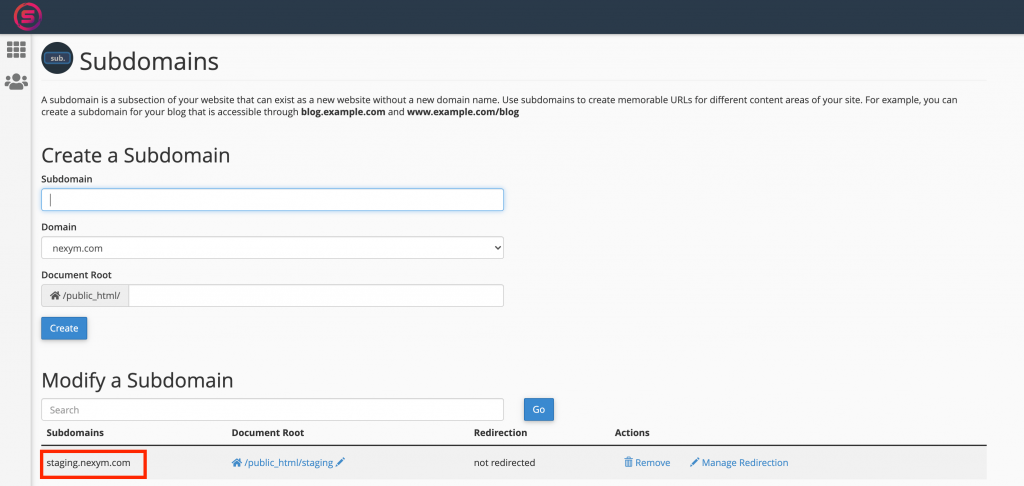
Once you create your subdomain, you can build a new website on it.

You also need to make sure your DNS settings are properly set up on your domain name, pointing to the correct nameservers or IP address at your web host.

Subdomains and SEO

Subdomains are a basic form of organization for your website content. When used properly, they will not affect your main website’s SEO (search engine optimization).

Google and other popular search engines have said that subdomains do not affect SEO.

This means you can create a subdomain or multiple subdomains under your main domain, and it won’t negatively impact the rankings and visibility of your site on Google.

The only thing to keep in mind is that if you create a subdomain, you are creating a new website. This means, your subdomain will have its own SEO.

Subdomains are independent websites and require their own SEO efforts to rank on Google.

Since subdomains are treated as completely different websites from your main domain name, they don’t share the same SEO .

So if blog.yoursite.com doesn’t rank well in Google, your main website won’t be penalized.

However, if you create a subdirectory instead of a subdomain (more on that below), your entire domain will be affected if the subdirectory doesn’t rank well on Google.

So if you create a subdomain, make sure the content is unique and optimized for that subdomain.

This way, you can prevent your main site from being penalized in Google if your subdomain doesn’t rank well.

If you have more than one subdomain and they are not getting sufficient traffic, it may make sense to create a temporary tab or widget on your main website homepage that points people to them. This way people can still find these resources while you figure out a better SEO strategy.

We recommend keeping all sections of your website on the same domain rather than using a subdomain. Generating traffic to one domain is hard enough, adding a completely new one could divert your focus and lead to bad rankings on both.

Ultimately, subdomains should only be used if you have a legitimate reason to do so. We discussed some of the reasons to use a subdomain above, for example, to rank in a specific market, target keywords, and localize to a certain geography or language.

In cases where you’d like to build strong SEO and need to organize sections of your website, opt for a subdirectory rather than a subdomain.

Subdomain or subdirectory?

A subdirectory is like a subdomain, only located within your main domain (i.e., infoceptor.com/test or infoceptor.com/blog).

You can create both subdomains and subdirectories under your main domain, as long as they are organized in a way that helps build traffic to your website.

If you want to rank in search engines for a particular keyword, and that keyword is specific to a certain subdirectory, create a subdirectory for that keyword.

But if you’d like all of your websites to be listed on separately on Google when people search for certain keywords, creating a subdomain might work best.

If you choose to create a subdomain, keep in mind that it will have its own SEO independent from the rest of your website. As mentioned above, this is a good thing if the subdomain doesn’t rank well. But on the other hand, creating multiple subdomains for different keywords can dilute your SEO traffic.

Often, it’s better to focus on one keyword per subdirectory and create a master subdomain that pulls in all of the other subdomains you’d like to rank for. This can be done by using 301 redirects.

In both cases, you’ll want to optimize the content for your subdirectory or subdomain so the websites get properly indexed by Google and search engines.

In general, when deciding between using a subdirectory and subdomain, keep these rules in mind:

  • If the section of your website is specific to one major keyword and that keyword happens to be your main focus, use a subdirectory.
  • If you’d like all of your website sections to show up on search engines when users are searching for keywords related to those sections, make sure they are in their own subdomains.
  • If you have more than one subdomain for a specific keyword, use 301 redirects to combine them as one master subdomain (which has its own SEO independent from your main domain).
  • If the purpose of creating a subdirectory or subdomain is not to rank well in Google, but rather just to organize your site, use subdirectories not subdomains.

You can always combine subdomains and subdirectories using 301 redirects to make them interact and funnel traffic however you’d like.

Ultimately, the best SEO practice is to choose which set up works best for helping build traffic to your website.

We hope this guide helped your understand subdomains, how to create a subdomain, subdomain SEO, and the difference between subdomains and subdirectories.

If you have any questions, feel free to leave a comment below and we’ll do our best to answer it!

People also viewed:

Read Infoceptor's review of best domain name registrars.Best domain registrars in 2023 Read Infoceptor's guide on how to register a domain name and get a domain name for free.How to register a domain name and tips to get one for free Read Infoceptor's tutorial on what a domain name is and how they work.What is a domain name? Infoceptor explains 5 ways to get a free email domain.5 ways to get a free email domain Read Infoceptor's guide on DNS to see how DNS works.What is DNS and how does DNS work?
subdirectory subdomain subdomains
Share. Facebook Twitter LinkedIn Reddit Telegram WhatsApp Pinterest Email
Previous ArticleHow to find your WordPress login link
Next Article Best slip-on sneakers that you can wear with anything
Matthew Drummond

Matthew is a Infoceptor Technology writer. Having worked as a systems administrator for over 15 years gives him unique insight into the inner works of technology. Ultimately his passion for writing brought him to share his technical expertise with the world.

Related Stories

Read Infoceptor's tutorial on what a domain name is and how they work.

What is a domain name?

January 4, 2024
Read Infoceptor's guide on how to register a domain name and get a domain name for free.

How to register a domain name and tips to get one for free

December 14, 2023
Read Infoceptor's review of best domain name registrars.

Best domain registrars in 2023

December 14, 2023
Infoceptor explains 5 ways to get a free email domain.

5 ways to get a free email domain

November 2, 2023

Comments are closed.

Connect
  • Facebook
  • Twitter
  • Pinterest
  • Instagram
  • YouTube
  • LinkedIn
  • Reddit
  • TikTok
Don't Miss
Flywheel Logo Reviews

Flywheel review in 2023

By Matthew Drummond

Flywheel is a fast-growing web host that offers high-performance WordPress hosting for agencies, designers, and developers.

Travel restrictions in Canada are different depending on where you're traveling from and to. Here's what you need to know before you go.

Canada: Traveling restrictions and what you need to know before you go

May 19, 2024
If you are planning a trip to Spain, there are some travel restrictions that must be taken into consideration.

Spain: Traveling restrictions and what you need to know before you go

May 19, 2024
Learn how to build wealth and financial security. This article will share steps you can take to build a reliable cash reserve that will grow over time.

Do you want to build wealth? Here are some ways to grow your money

May 18, 2024
  • Auto
    • Auto Reviews
    • Electric
    • Insurance
  • Business
    • Company
    • Government
  • Entertainment
    • Movies
    • Music
  • Finance
    • Credit Cards
    • Crypto
    • Market
    • Personal Finance
  • Food
    • Coffee
    • Drinks
    • Holidays
  • Health
  • Beauty
  • Fitness
  • Food
  • Medical
  • Home
  • Backyard
  • Bathroom
  • Bedroom
  • Cleaning
  • Furniture
  • Home Office
  • Kitchen
  • Life
  • Astrology
  • Family
  • Fashion
  • Outdoors
  • Personal
  • Pets
  • Apple
  • Audio
  • Domain Names
  • Gaming
  • Google
  • Power
  • Reviews
  • Samsung
  • Destinations
  • Gear
  • Services
  • Space
  • Tourism
  • Technology
  • Tutorials
  • Web Hosting
  • WiFi
  • WordPress
  • Travel
  • Shopping
  • Sports
  • Work
  • Stocks
  • Television
  • Web Hosting
Facebook X (Twitter) Instagram Pinterest YouTube LinkedIn Reddit TikTok
© 2026 Infoceptor

Type above and press Enter to search. Press Esc to cancel.